
BUILDING REAL-TIME NATURAL ENVIRONMENTS — PART 02
Capturing foliage atlases
Capturing and processing foliage using 2D and 3D methods.
PHOTOMETRIC STEREO
This is the current gold standard for capturing foliage. It involves using lights in a controlled environment to capture the foliage being lit from different angles.
Once set up, it’s rather quick to get results but it does require additional equipment.
Some of the equipment—such as a proper LED backlight—can be tricky to get hold of and travel with, but while capturing translucency is ideal, it’s not the most important.
Albedo and Normal, the two primary maps derived from this workflow.
Arranging the atlas
This is the part where you get to pack your UVs in “real-time”!
Some repacking is usually in order—especially when combining sets together—but you can avoid some work by being strategic about it.
A few things you should take into consideration:
Don’t pack them so close they cast shadows on each other
Keep the relative coverage of the atlas small
This minimizes light falloff across the atlas
Background
The ideal background is one that doesn’t reflect anything back, as the bright lights used will cause more light to bounce, creating a secondary light source.
A matte, black background will produce the cleanest results, although a white one usually does the trick if that’s what you have.
Light absorbing cloth used for a turntable scan. Does what it says.
Light absorbing cloth is very useful. It can help automate the masking process and doesn’t cause light bouncing on the subject, but is expensive and gets dirty.
Image-processing
Normals
There are a few options:
Details Capture
RelightLab
Substance Designer
Details Capture has the ability to automatically detect the light direction for you if you used a chrome ball or similar, however this is where the advantages end.
RelightLab we haven’t tested, but it’s a free option. It might be worth checking if you’re just getting started.
Substance Designer has the best overall toolset, especially if you want to automate the process which wouldn’t be easy anywhere else.
Albedo
Albedo is captured separately using a cross-polarized setup to eliminate all additional lighting and reflective information.
An alternative method is combining all the lit areas in the directionally lit images can produce a mostly neutral albedo.
If you find yourself not being able to get a clean albedo shot, this might help.
Cross-polarized (left) - Generated (right) — results may differ, but in this case it wasn’t very accurate
Heightmap
Height is derived from the normal map. This gives more than good enough results for the purpose of shape recovery. If you use Substance Designer, use the Normal to Height node (not the HQ one!).
A good free alternative is Materialize, although it’s not node based so we only use it selectively.
The purpose is to add shape, not detail. Make sure that your heightmap conversion has a high sample spread to capture the large shapes.
Translucency
Capturing translucency is an important part of ensuring you end up with a complete, physically accurate dataset, but it can also be the trickiest to capture—mainly due to the equipment required.
In theory, all you have to do is capture a single shot of the subject being lit from behind, which in itself is easy, but a few practical challenges arise:
Finding a large enough, plug & play LED panel isn’t always that easy
Traveling with a large LED panel is very impractical
The best solution to this would likely be having modular or foldable panels. Certainly possible—and there might be products such as Aptolux MP-1 which could do the trick—but we have yet to test those.
80×80cm LED panel. Thin, but won’t fit into typical luggage.
If you want to learn more in-depth about photometric stereo, this video by Grzegorz Baran touches on the basics nicely:
Lighting artifacts
Uneven backlighting
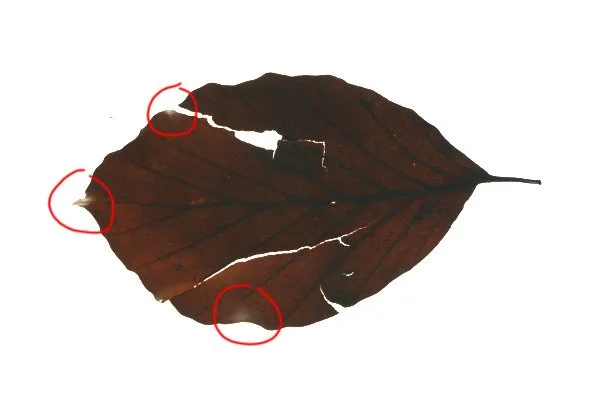
When capturing translucency on an LED panel, leaf edges that curl towards the light can appear disproportionately bright.
This is particularly noticeable on strongly curled or uneven leaves.
Unwanted translucency
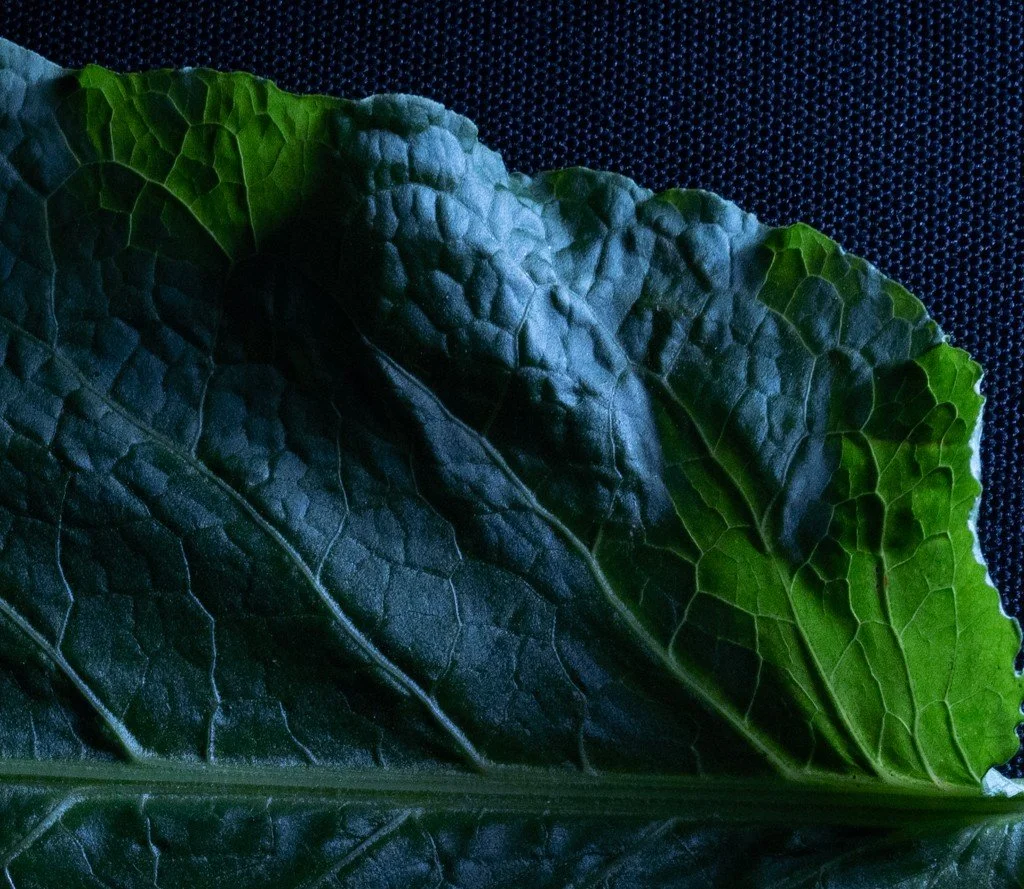
When capturing directional lighting, strongly curved leaves can show unwanted translucency around their edges.
Raising the light source and adjusting its angle can help reduce this, although it can be difficult to avoid completely.
PHOTOGRAMMETRY
This is a rather unorthodox approach to atlasing due to the inherent drawbacks of 3D scanning foliage. It can however generate good results, with some caveats.
Test case: Petasites hybridus
We chose Petasites hybridus for its large leaves, pronounced folds and overlapping areas.
These features made it a useful test of whether capturing the shape in 3D justified the additional processing and clean-up.
We did have some bottlenecks in this experiment:
Processing each leaf individually. Partly due to size, and partly due to the accuracy needed when doing this kind of scanning
Creating a clean alpha map for cut-out despite the bright LED background—mainly due to some misalignments on the edges, which fortunately didn’t have much effect on the actual mesh once cut
Manual clean-up was necessary
Most of these things are relatively automatable. Most of it will depend on how reliable your captures are. High consistency means reliable automated output, while low consistency means manual input.
This is the crux of why photometric stereo is king.
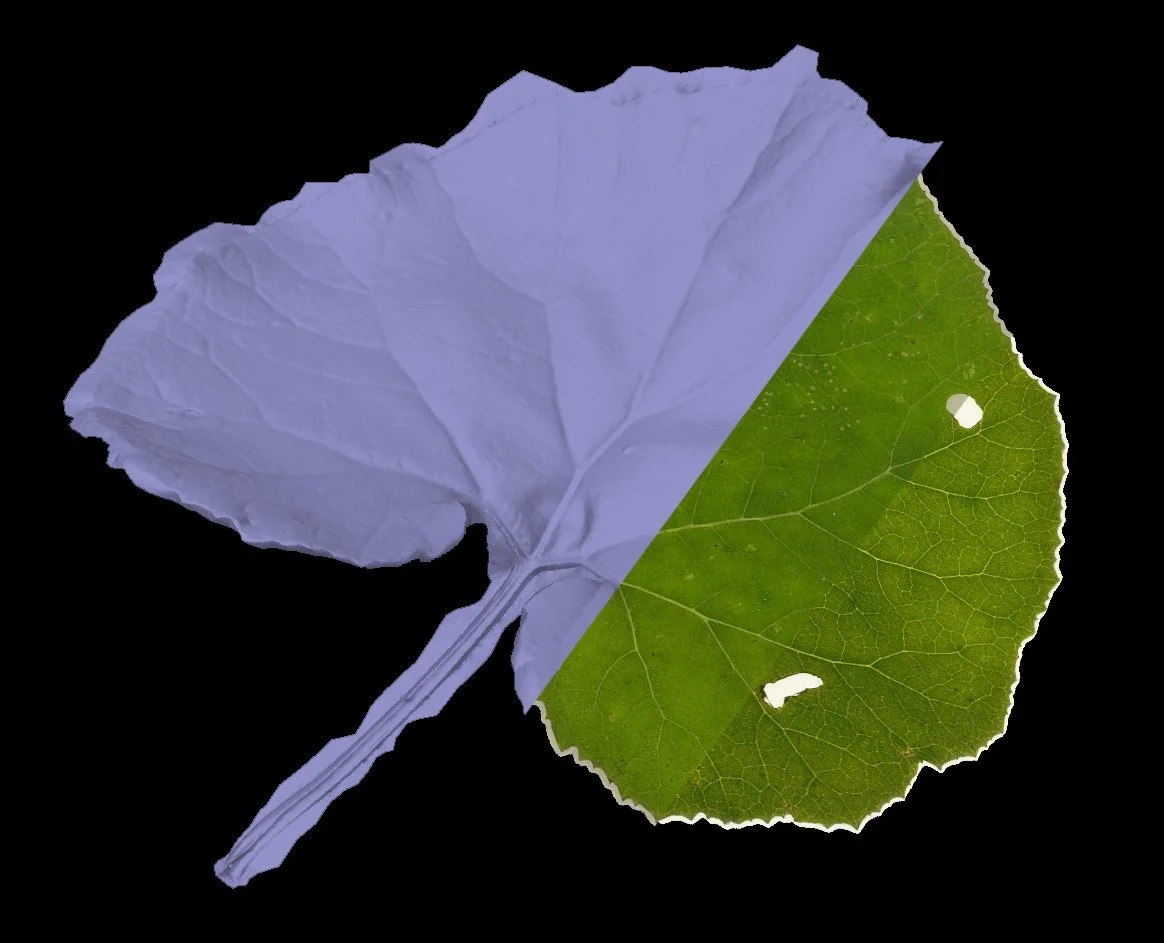
Scan source/Albedo/SSS
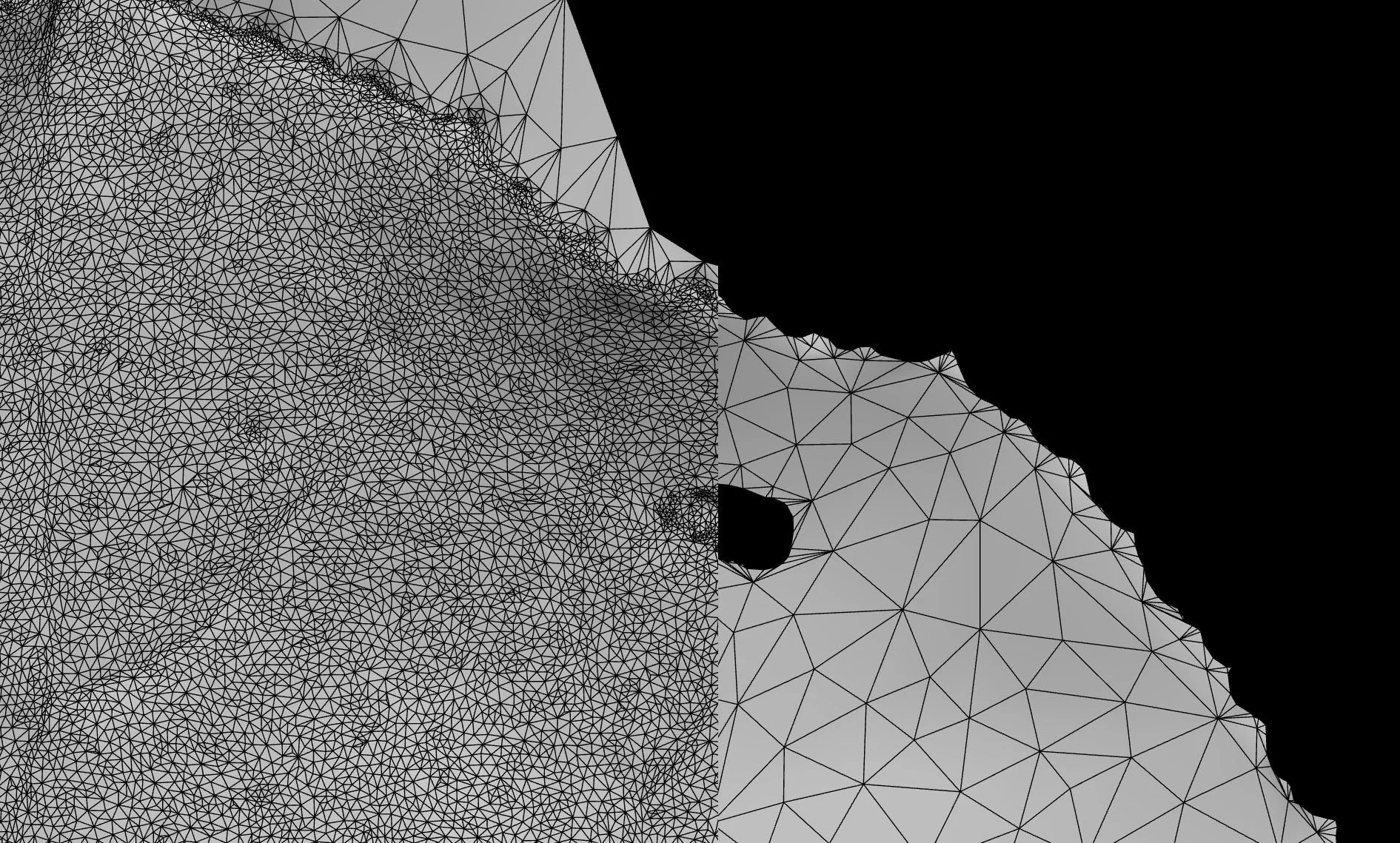
Raw mesh → Remeshed
Photogrammetry is worth considering when preserving a leaf’s larger folds and overlapping shapes justifies the additional processing and clean-up.
MESHING
The main thing to keep in mind when remeshing is edge preservation.
Since we are not using alpha cards, we need the edges of our cut-outs to hold up to avoid blocky silhouettes on our foliage atlas geometry.
Same triangle count, much stronger silhouette.
Final thoughts
Photometric stereo remains the preferred approach for most foliage. Consistent captures make the processing easier to repeat and automate, which becomes increasingly important when building a large collection of assets.
Photogrammetry has its place for larger leaves with more complex shapes, but the additional processing and manual clean-up need to be justified by what those shapes contribute to the final asset.
Both approaches benefit from decisions made early: choosing suitable subjects, arranging the capture carefully and understanding how the resulting geometry will be used. Getting these things right reduces the work needed later and helps preserve the features that matter.
The capture method should suit both the leaf and the production it’s being built for.
SERVICES
Let’s discuss Your Production
-
We develop complete natural environments around your art direction and production requirements.
From field-capture and asset creation to scene assembly and lighting, we bring the individual elements together into a cohesive environment, with detail and performance tailored to how it will be used.
-
We create trees and foliage with close attention to branching structure, silhouette, scale and the character of each species.
Our foliage is developed around your art direction and technical requirements, balancing the detail needed on camera with the performance demands of your project.
-
We capture natural assets and surfaces at a range of scales using:
Handheld photogrammetry
Drone photogrammetry
Photometric stereo capture
We process the captured data into usable geometry and textures, with clean-up, detail levels and output formats tailored to your production requirements.
-
We optimize assets and environments around your target hardware, frame-rate goals and memory budgets.
Complexity is adjusted to balance performance with the visual detail needed for your production.
-
We help integrate our assets and environments into your existing project, working with your team’s requirements for asset organization, engine compatibility and delivery formats.
This reduces the additional preparation needed after handover and helps your team put the content to work.
Whether you need a hero location, a complete environment,
or production support, we'd love to discuss your project.
Whether you need hero assets, a complete environment, or production support, we'd love to discuss your project.
Start a conversation
Tell us what you’re building and where you need support—from individual assets to a complete natural environment.
Prefer email? — services@apexnature.studio